The XRP for WooCommerce plugin by RyanPlugins lets you accept Ripple payments directly on your store — no payment processor, no chargebacks, and no custodial account required. XRP settles in three to five seconds at a cost of roughly $0.0002 per transaction, making it one of the most efficient cryptocurrency payment options available to WooCommerce merchants today. The plugin is a $79 USD one-time purchase — no subscription, no per-transaction platform fee.
This guide covers what makes XRP uniquely well-suited for e-commerce, how the RyanPlugins Crypto Wallet for WooCommerce brings XRP payments to your store, what it costs, and how to get started quickly.
What Is XRP and Why Are Merchants Taking Notice?
XRP is the native digital asset of the XRP Ledger (XRPL), an open-source blockchain launched in 2012 and designed from the ground up for high-throughput financial transactions. Unlike Bitcoin — which was engineered as a store of value — XRP was built specifically for moving money fast and at minimal cost. That difference in design philosophy matters enormously when it comes to accepting payments at checkout.
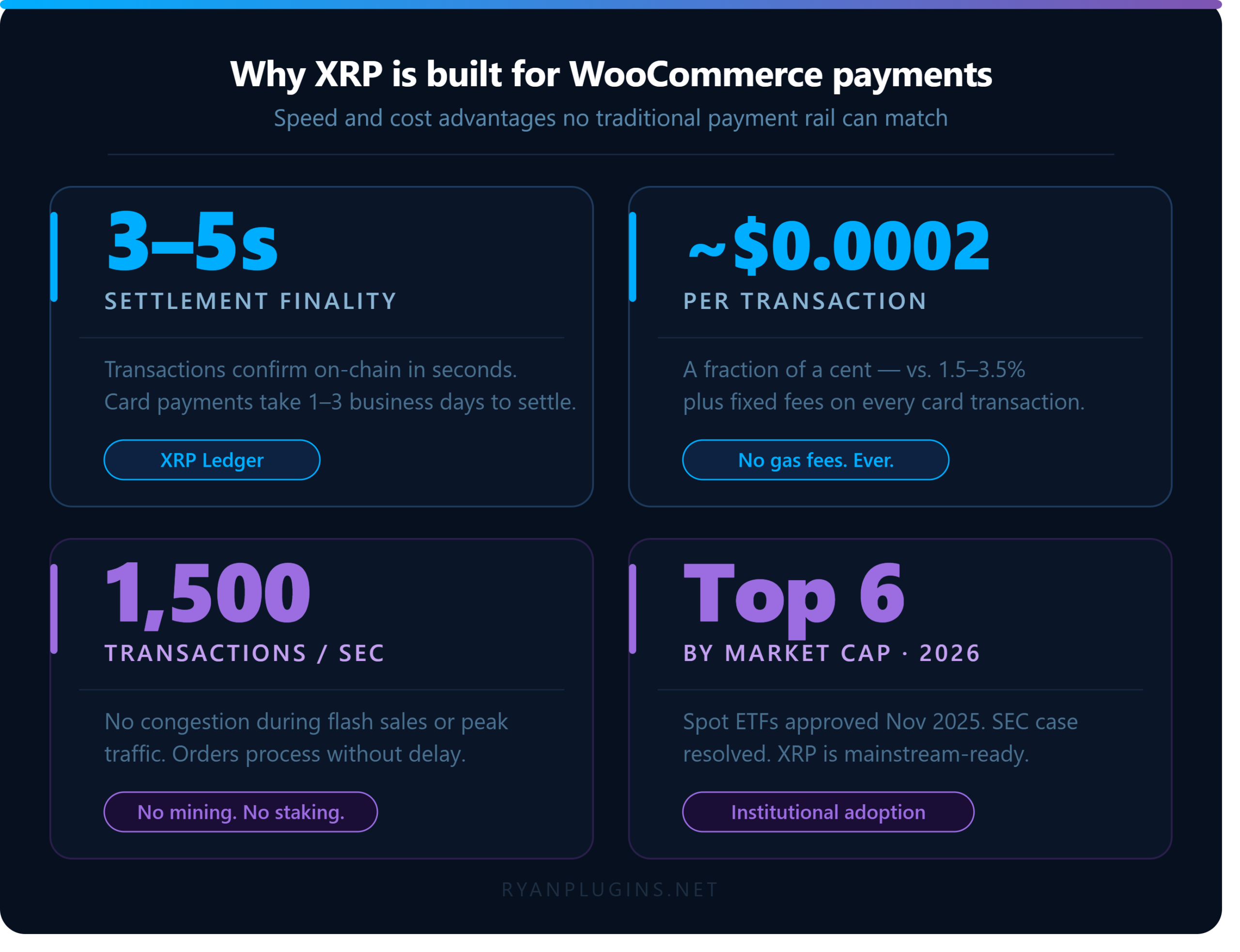
The XRPL processes up to 1,500 transactions per second and settles each one in three to five seconds with a fee of roughly $0.0002. The network relies on a Federated Consensus model where independent validators agree on the order of transactions without burning energy. This makes XRP one of the most environmentally efficient cryptocurrencies in circulation — a selling point that resonates with a meaningful portion of modern consumers.
Institutional momentum behind XRP has accelerated significantly. The SEC’s case against Ripple Labs reached a resolution, and by November 2025, multiple spot XRP ETFs gained approval in the United States from issuers including Bitwise, Grayscale, 21Shares, Canary Capital, and Franklin Templeton. XRP now ranks among the top six cryptocurrencies by market capitalization. This is not a fringe asset — it is a payment technology with deep liquidity, growing regulatory clarity, and an established track record in cross-border settlement.
The Case for Accepting XRP in Your WooCommerce Store
Payments That Settle Before the Page Reloads
Credit card transactions go through authorization, settlement, and clearing cycles that can take one to three business days before funds reach a merchant’s account. XRP payments confirm on-chain in three to five seconds. Your WooCommerce order status updates almost immediately after the buyer sends funds — no waiting, no manual reconciliation, no chargeback windows to worry about.
Near-Zero Transaction Costs
Standard card processing fees run between 1.5% and 3.5% per transaction, plus fixed per-transaction charges. On a $100 order, that can cost you $2.00–$3.50 in processing fees. An XRP transaction costs roughly $0.0002 regardless of order size. For high-ticket items, international orders, or stores with thin margins, that difference is significant. You keep more of every sale.
No Chargebacks
Blockchain transactions are final. Once an XRP payment confirms on the ledger, the buyer’s bank cannot reverse it and no card network can dispute it. For merchants selling digital goods, software licenses, or services where chargeback fraud is a known risk, this is a significant operational advantage that directly protects your revenue.
A Global Customer Base Without Currency Friction
XRP was designed as a bridge asset for cross-border value transfer. Your buyer in the Philippines, Japan, or Brazil can pay in XRP without encountering currency conversion fees, foreign transaction surcharges, or bank delays. The XRP Ledger handles 1,500 transactions per second with no congestion during peak traffic, so high-volume sale events will not degrade the checkout experience.
How the RyanPlugins Crypto Wallet Handles XRP in WooCommerce
The RyanPlugins Crypto Wallet for WooCommerce adds XRP as a native payment gateway on your store without routing through any third-party processor. Payments go directly from the customer’s XRP wallet to your wallet address — peer-to-peer, non-custodial, and with no platform taking a cut of each transaction.
Here is how the checkout flow works:
- The customer selects Pay with XRP at checkout.
- The plugin fetches the live XRP/USD rate and calculates the exact XRP amount for the order total.
- A QR code and your XRP wallet address display on screen.
- The customer sends payment from any XRPL-compatible wallet.
- The plugin monitors the ledger and marks the WooCommerce order as paid once the transaction confirms — typically within seconds.
The plugin is compatible with both Classic Checkout and the WooCommerce Blocks checkout. No API keys from a payment processor are required. No KYC. No monthly subscription to a gateway service. Configure your XRP wallet address once in the WordPress admin panel, and the gateway is live.
XRP vs. Other Crypto Payment Options for WooCommerce
Most crypto payment gateways for WooCommerce fall into one of two categories: multi-coin aggregators that route through a custodial processor, or single-coin plugins that require you to manage on-chain verification yourself. The RyanPlugins Crypto Wallet takes a different approach — it supports multiple assets including XRP with direct wallet-to-wallet settlement and real-time exchange rate conversion built in.
Where XRP stands out against the alternatives:
- Bitcoin (BTC): Average confirmation time is 10 minutes per block and fees spike during congestion. XRP settles in seconds at a fixed fraction of a cent.
- Ethereum (ETH): Gas fees are unpredictable and can exceed several dollars during high network activity. XRP fees are deterministic and negligible.
- Stablecoins (USDC, USDT): Low volatility but require third-party issuers, smart contract risk, and often custodial on/off ramps. XRP is a native ledger asset with no intermediary.
For merchants who prioritise payment speed, predictable costs, and non-custodial settlement, XRP is the strongest technical choice among the leading cryptocurrencies.
Handling XRP Volatility: What Merchants Should Know
Like all cryptocurrencies, XRP’s fiat price fluctuates. The plugin calculates the XRP equivalent of each order total at the moment of checkout using a live rate feed, so customers always pay the correct XRP amount for the stated USD price. You receive the exact XRP amount that corresponds to your product’s listed price at that moment.
If you prefer zero crypto exposure, you can convert received XRP to your local currency via an exchange immediately after settlement. Because XRP confirms in seconds and has deep liquidity across all major exchanges, this conversion can happen within minutes — giving you a workflow that mirrors traditional payment processing, but with lower fees and no chargeback risk.
Is Accepting XRP Legal for Your WooCommerce Store?
The regulatory landscape for XRP has cleared considerably since 2024. The SEC’s case against Ripple reached resolution, and the November 2025 approval of spot XRP ETFs signals that US regulators now treat XRP as a commodity-like digital asset. In most jurisdictions, accepting XRP as payment for goods or services is treated similarly to accepting any other cryptocurrency — you receive it, report it at fair market value for tax purposes, and handle conversion according to local guidance.
Consult a tax or legal advisor familiar with cryptocurrency in your specific jurisdiction. This post is informational, not legal or financial advice.
Pricing: One Plugin, One Payment, Every Feature Included
The RyanPlugins Crypto Wallet for WooCommerce is priced as a straightforward $79 USD one-time purchase. There’s no recurring subscription, no percentage taken from your XRP transactions, and no tiered feature-gating — every store that buys the plugin gets the full XRP gateway plus support for Bitcoin, Cardano, and Solana.
RyanPlugins Crypto Wallet for WooCommerce
$79 USD
One-time purchase — no subscription, no per-transaction fee
- ✅ Native XRP, Bitcoin, Cardano & Solana gateways
- ✅ Non-custodial, wallet-to-wallet settlement
- ✅ Live exchange rate conversion at checkout
- ✅ Classic Checkout + WooCommerce Blocks support
- ✅ QR code payment display & automatic order confirmation
- ✅ Plugin updates and support via Patreon
Setting Up XRP Payments on WooCommerce: Quick Overview
Getting XRP live on your store with the RyanPlugins Crypto Wallet plugin is straightforward:
- Get the plugin for a one-time payment of $79 USD via Patreon (link below) and install it through WordPress → Plugins → Add New → Upload.
- Activate and navigate to WooCommerce → Settings → Payments → Crypto Wallet.
- Enter your XRP wallet address in the XRP payment gateway settings. Use a wallet you control directly — a hardware wallet or non-custodial software wallet.
- Set your currency pair and rate refresh interval. The plugin fetches live rates automatically.
- Enable the gateway and save. XRP now appears as a payment option at WooCommerce checkout.
No server-side scripts to configure, no webhook endpoints to register with a third-party API. The plugin handles on-chain payment verification independently.
Which WooCommerce Stores Benefit Most from XRP?
XRP payments deliver the most value for these store types:
- Digital product stores — software licenses, plugins, design assets, eBooks — where instant order fulfilment and zero chargebacks are critical.
- International e-commerce — stores serving buyers across multiple currencies, where card declines and cross-border charges erode conversion rates.
- High-ticket items — where saving 2–3% on payment processing fees creates meaningful margin improvement per order.
- Crypto-native audiences — stores catering to tech-forward buyers who prefer transacting on-chain and hold XRP as part of their portfolio.
- Subscription and membership sites — where recurring payment friction, failed card charges, and chargeback risk make a non-custodial alternative appealing.
Frequently Asked Questions: XRP for WooCommerce
How much does the RyanPlugins Crypto Wallet plugin cost?
The plugin is a $79 USD one-time purchase available through Patreon. There is no subscription and no percentage fee taken from your XRP transactions — you pay once and own the plugin, including support for Bitcoin, Cardano, and Solana in addition to XRP.
Is the plugin compatible with WooCommerce Blocks checkout?
Yes. The plugin supports both the classic shortcode checkout and the Gutenberg-based WooCommerce Blocks checkout introduced in WooCommerce 8.x and later.
What do I need to set up XRP payments on my store?
You need an active WooCommerce store, the Crypto Wallet plugin installed and activated, and an XRP wallet address you control, such as a hardware wallet or a non-custodial software wallet. No payment processor account, API keys, or KYC sign-up are required — you enter your wallet address in WooCommerce → Settings → Payments → Crypto Wallet and the gateway is ready.
Is the plugin secure, and do I need to trust a third party with my funds?
The gateway is non-custodial: payments go directly from the customer’s XRP wallet to your wallet address on the XRP Ledger, and the plugin never holds, forwards, or has access to your funds. Because there is no third-party processor in the payment path, there is no platform custody risk — you control your wallet’s private keys at all times.
Does my store need to hold XRP to accept it?
No. The plugin displays your wallet address and verifies incoming transactions. You receive XRP directly into a wallet you control. Convert to fiat any time through an exchange of your choice.
Can I accept XRP alongside card payments?
Yes. The Crypto Wallet gateway runs alongside any other active payment gateway — Stripe, PayPal, accept.blue, or any WooCommerce-compatible processor. Customers choose their preferred method at checkout.
Start Accepting XRP on Your WooCommerce Store Today
XRP for WooCommerce is one of the most technically sound cryptocurrency payment integrations you can add to your store in 2025. Fast settlement, negligible fees, no chargebacks, and growing mainstream acceptance make it a strong addition to any payment stack — especially now that regulatory clarity has arrived and institutional XRP ETFs are live.
The RyanPlugins Crypto Wallet for WooCommerce gives you a direct, non-custodial path to XRP payments for a single $79 USD one-time purchase — no payment processor account, no KYC sign-up, and no per-transaction platform fees.

One-time purchase of $79 USD. Early access and premium plugin support available on Patreon. Plugin is actively maintained and updated.