
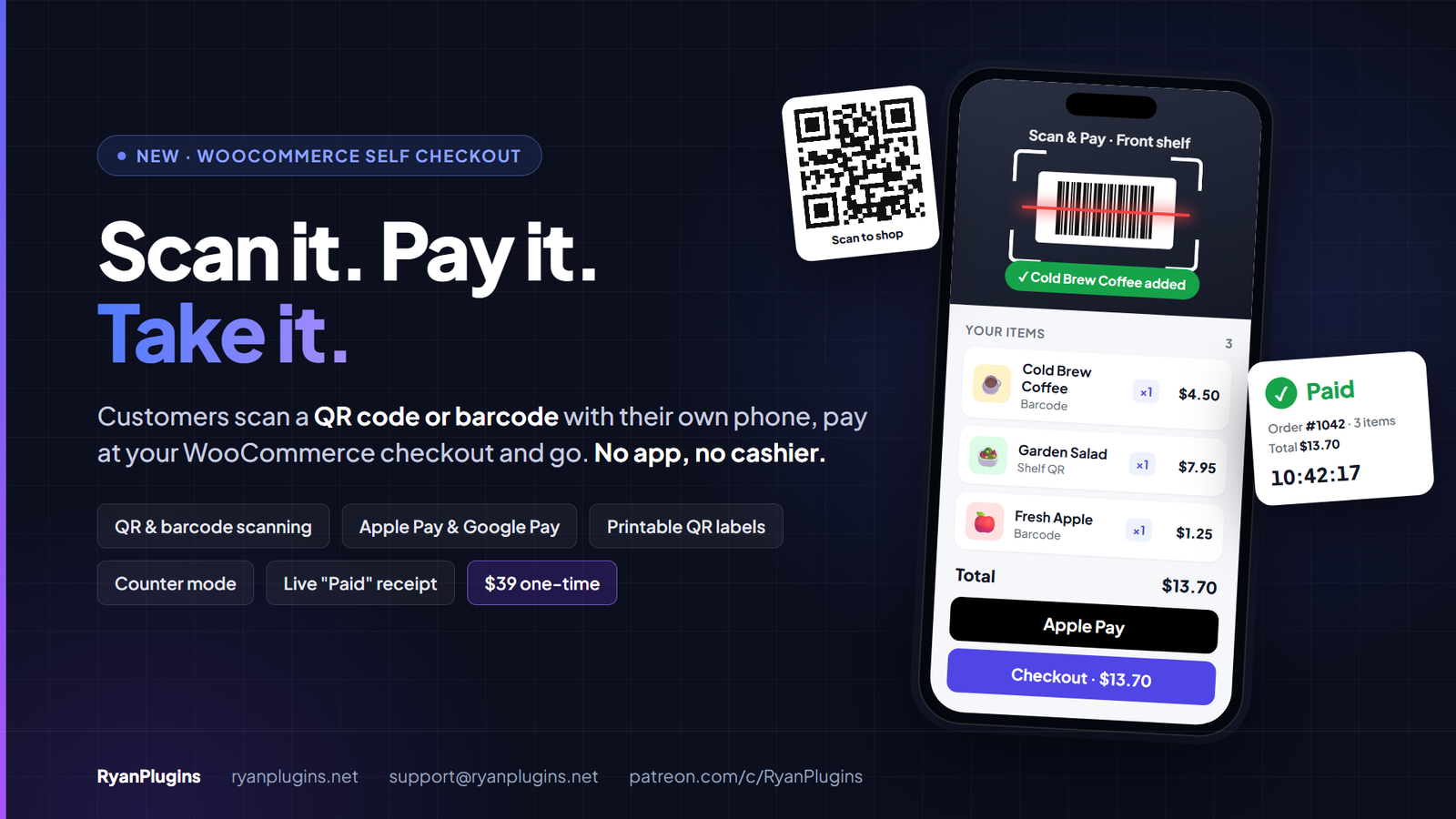
Selling without a cashier is easier when the customer’s own phone does the work. Scan & Pay for WooCommerce by RyanPlugins turns any WooCommerce store into a self checkout: customers scan a QR code or an item’s barcode, pay at your normal checkout, and take the item. It costs $39 USD, one-time purchase, with no monthly fee.
One-time purchase. No monthly fee.
What is Scan & Pay for WooCommerce?
It’s a WordPress plugin for honor-system stores, office pantries, farm stands, fridges and pop-ups with nobody at the till. There’s no app to install and no special hardware to buy. Your customers already carry the scanner in their pocket.
Scan & Pay never charges a card itself. It fills the cart and simplifies the checkout for carts started from a scan. Every payment goes through the payment gateway your store already uses.
How self checkout works
- Scan the store QR code. The customer points the phone’s own camera at your posted sign. It opens your scanner page in the browser.
- Scan the items. They scan each product’s barcode, or the QR code on a shelf label. Every scan flashes, vibrates and beeps, and the item list keeps a running total.
- Pay. They pay at your WooCommerce checkout with any payment method you offer, or in one tap with Apple Pay or Google Pay.
- Take the items. A live “Paid” receipt with the order number and a running clock is there to show if anyone asks.
Features
A scanner that opens like an app
- A full-screen scanner page with no theme header, sidebar or footer (you can turn that off)
- Reads product barcodes (EAN, UPC, Code 128, Code 39) and QR codes right in the phone’s browser, including iPhone
- Matches barcodes to the product’s GTIN, UPC, EAN or ISBN field, then its SKU. A UPC is found whether it was saved as 12, 13 or 14 digits.
- A “Type a code” fallback for damaged barcodes
- Out-of-stock, private, draft and unpriced products are never added
Printable QR signs and shelf labels
- A store sign for the whole store, plus one per location (“Front shelf”, “Fridge”)
- Shelf labels with each product’s name, price and QR code, for items without a barcode
- Your logo, headline, steps, footer and colours on the sign
- Labels for all products, chosen categories, or hand-picked products and variations
- Letter or A4 sheets to cut out, or Avery 5163 / 8163 and L7163 sticker sheets
A faster checkout for scanned carts
- Scan & Go checkout: no shipping, guest checkout, and only name, email, country and ZIP code. Each option can be turned off.
- Express pay: Apple Pay and Google Pay buttons right under the scanned items, when your payment plugin offers them (accept.blue Payment Gateway v2 does)
- Choose which payment methods scanned carts are offered, for example only Apple Pay, Google Pay and card
- A cart holding a subscription keeps your normal checkout
Counter mode for stores with staff
Activate your RyanPlugins license key to unlock the Counter. The cashier scans the items on a phone, tablet or computer (camera or USB barcode scanner) and taps Charge. The customer scans the QR code on the cashier’s screen and pays on their own phone, and the screen shows “Paid” as soon as they have. Cash and card-terminal payments are marked paid with one tap. A new Cashier user role can use the counter and nothing else.
Know where every order came from
Orders record the location and how they were started (store QR code, product QR code or barcode), and each line keeps the barcode that added it. The Orders list gets a Scan location column and a filter. Scan & Pay works with the classic and the block checkout, and with High-Performance Order Storage.
Pricing
Scan & Pay for WooCommerce
$39 USD
One-time purchase. No monthly fee.
- ✓ Scanner page, QR signs and shelf labels
- ✓ Scan & Go checkout and express pay
- ✓ Counter mode with a Cashier role
- ✓ No cut of your sales
You pay $39 USD once. Scan & Pay never takes a percentage of your sales, because payments go straight through your own WooCommerce payment gateway at its normal rates.
Requirements
- WordPress 6.2 or later
- WooCommerce 9.2 or later
- PHP 7.4 or later
- HTTPS on your site, because phone browsers only allow the camera on secure pages
Frequently asked questions
How much does Scan & Pay for WooCommerce cost?
Scan & Pay for WooCommerce costs $39 USD as a one-time purchase. There is no monthly fee, and the plugin never takes a cut of your sales, because every payment goes through your own WooCommerce payment gateway.
Is it compatible with my WooCommerce store?
Scan & Pay needs WordPress 6.2 or later, WooCommerce 9.2 or later and PHP 7.4 or later. It works with both the classic and the block checkout, with High-Performance Order Storage, and with the payment methods your checkout already offers.
What do I need to set it up?
Your site must use HTTPS, because phone browsers only allow the camera on secure pages. Turn on Scan & Pay in the WooCommerce settings, click Create the scanner page, then print your store sign and shelf labels. Customers need no app, because the scanner opens in the phone browser.
Does it work on iPhone?
Yes. Safari has no built-in barcode reader, so the scanner page loads a bundled reader on iPhone. Other phones use the barcode reader built into the browser where one is available.
Is it secure for an unattended store?
Scan & Pay never charges a card itself, so card details only ever go to your own payment gateway. Out-of-stock, private and unpriced products are never added to the cart, and the live Paid receipt shows the order number and a running clock, so an old screenshot can be told apart from a real receipt. Unattended stores attract card testing, so also turn on the card testing protection in your payment gateway, such as rate limits or a CAPTCHA at checkout.
Can I use it with a cashier?
Yes. Activate your RyanPlugins license key to unlock the Counter, then add staff with the Cashier role. The cashier scans the items with a phone, tablet, computer or USB barcode scanner, and the customer pays by scanning the QR code on the screen, or pays by cash or card terminal. A cashier sees only the counter, not your orders, customers or settings.
Start selling without a cashier
Put a QR sign on the shelf, and your WooCommerce store becomes a self checkout that never takes a break. Scan & Pay for WooCommerce is $39 USD, one-time purchase.