A CyberSource Secure Acceptance profile is the foundation of any hosted checkout integration on WooCommerce. Get the profile configuration wrong — mismatched keys, the wrong response format, an inactive profile — and transactions will fail silently or get rejected at the gateway level. Below is the exact process for creating a working CyberSource Secure Acceptance profile in the CyberSource Business Center, followed by how the RyanPlugins CyberSource Payment Gateway for WooCommerce ($79 USD, one-time purchase) plugs directly into that profile with no custom development required.
What Is a CyberSource Secure Acceptance Profile?
A CyberSource Secure Acceptance profile is a set of rules and credentials configured inside your CyberSource Merchant Business Center. It tells CyberSource which card types to accept, where to send the customer after a transaction, and which access key and secret key your store should use to sign requests. Every hosted checkout or Secure Acceptance transaction runs through a profile like this — without one, there is nothing for your WooCommerce store to connect to.
Step-by-Step: How to Create a CyberSource Secure Acceptance Profile
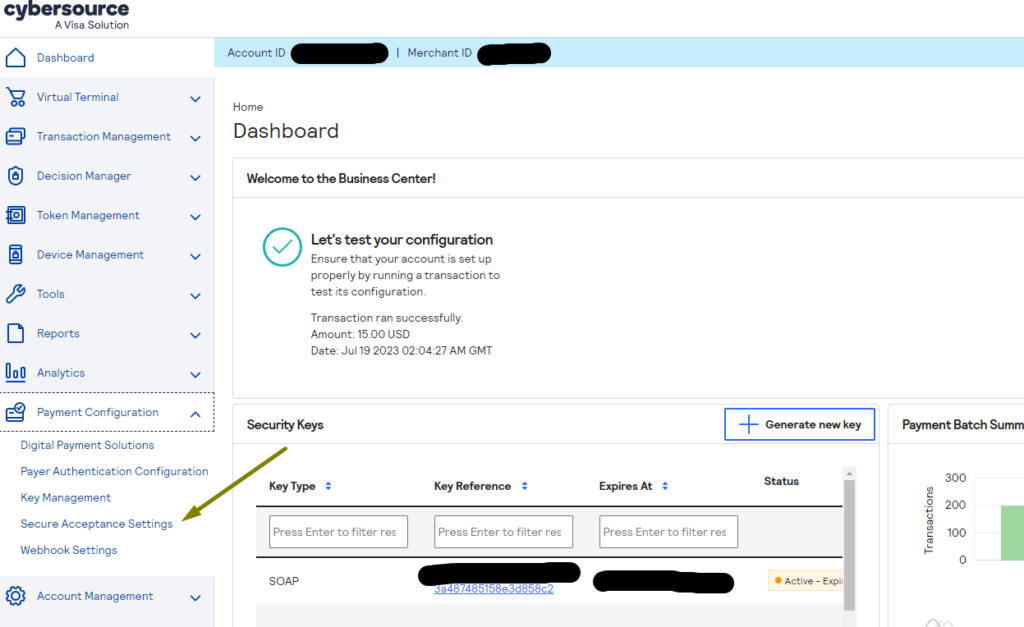
- Log in to the CyberSource Merchant Business Center. From the dashboard menu, navigate to Payment Configuration > Secure Acceptance Settings.
- Click “New Profile.” This opens the profile creation form.
- Fill in your profile information. Give the profile a clear, identifiable name and complete the general profile details.
- Save the General Settings. This locks in the base configuration before you move on to payment methods.
- Configure Payment Settings and card types. Select which card types you want to accept, then open each card’s settings to review and adjust its individual options before submitting and saving the payment configuration.
- Configure your Security Settings and generate profile keys. Create a new Secure Acceptance key pair, fill in the key details, and click Create. Copy or download the Access Key and Secret Key immediately — you’ll need both to connect your WooCommerce plugin.
- Configure your Customer Response settings. Set up the transaction (success) page and the cancel page behavior, then save your response settings.
- Activate the profile. A newly created profile is inactive by default. Promote it to Active status, or it will reject every transaction sent to it.
Once your CyberSource Secure Acceptance profile is active and you have your Access Key and Secret Key saved somewhere secure, the CyberSource side of the setup is done. The remaining work — connecting those credentials to WooCommerce, mapping order data, handling responses, and reconciling transactions — is where most manual integrations run into trouble.
Skip the manual integration
Connect Your Secure Acceptance Profile to WooCommerce in Minutes
The RyanPlugins CyberSource Payment Gateway plugs your Secure Acceptance keys straight into WooCommerce checkout — no custom code, no manual API mapping.
Get the Plugin — $79 USD (One-Time Purchase)Why Use a Dedicated Plugin Instead of a Custom Integration?
- Direct mapping between your Secure Acceptance profile fields and WooCommerce order data
- Built-in handling for transaction, cancel, and decline responses
- No developer retainer needed to maintain the integration as CyberSource updates its API
- Works with your existing Access Key / Secret Key pair from the profile you just created
- One-time cost instead of an ongoing agency or freelance development bill
Pricing
The RyanPlugins CyberSource Payment Gateway for WooCommerce is available for a single, transparent price: $79 USD, one-time purchase. No subscriptions, no recurring license fees, no per-transaction markup on top of what CyberSource already charges.
Frequently Asked Questions
How much does the CyberSource Payment Gateway plugin cost?
The plugin is $79 USD as a one-time purchase. There are no recurring subscription fees or hidden renewal charges for using the plugin itself.
Is this plugin compatible with my WooCommerce store?
The plugin is built for WooCommerce on standard WordPress installs. It works alongside most themes and checkout customizations. If you run a heavily modified checkout flow, it’s worth checking compatibility with your specific setup before purchase.
What do I need to set up before installing the plugin?
You need an active CyberSource Secure Acceptance profile with your Access Key and Secret Key generated, as covered in the step-by-step guide above. Once the profile is active in your CyberSource Business Center, you enter those credentials directly into the plugin settings.
Is my customer payment data secure?
Yes. The plugin routes transactions through CyberSource’s Secure Acceptance hosted checkout, meaning sensitive card data is handled by CyberSource’s PCI-compliant infrastructure rather than stored on your WordPress server.
Do I need a developer to install and configure this?
No. The plugin is designed for store owners to install and configure themselves once the Secure Acceptance profile is set up. You paste in your Access Key and Secret Key, configure a few checkout settings, and you’re ready to accept payments.
Does the $79 price include future updates?
Yes. The $79 one-time purchase includes plugin updates, so your integration stays current as CyberSource evolves its API.
Your Secure Acceptance Profile Is Ready. Connect It Now.
Get the RyanPlugins CyberSource Payment Gateway for WooCommerce and start accepting card payments through your profile today.
Get the Plugin — $79 USD (One-Time Purchase)