The CyberSource WooCommerce Payment Gateway plugin connects your store’s checkout directly to CyberSource’s Unified Checkout (UCO) Sessions API — the same infrastructure trusted by large-scale merchants worldwide. For a $79 USD one-time purchase, you get lifetime access to the CyberSource WooCommerce Payment Gateway with no recurring license fees. In this guide, we’ll walk through downloading, installing, and configuring the plugin from start to finish.
Why Choose the CyberSource WooCommerce Payment Gateway
Built on CyberSource’s modern Unified Checkout Sessions API and the VAS.UnifiedCheckout() SDK, the CyberSource WooCommerce Payment Gateway replaces older Flex/Microform integrations with a faster, more secure checkout flow. Key features include:
- Native integration with CyberSource Unified Checkout (UCO) Sessions API
- PCI-compliant hosted card fields — cardholder data never touches your server
- Support for both sandbox (test) and live production environments
- Compatible with the WooCommerce Blocks-based checkout as well as the classic (shortcode) checkout
- Built-in refund and transaction management from the WooCommerce order screen
- Detailed transaction logging for troubleshooting and reconciliation
- Regular updates to track CyberSource API changes
CyberSource WooCommerce Payment Gateway System Requirements
Before installing the CyberSource WooCommerce Payment Gateway, confirm your store meets the following requirements:
- WordPress 5.8 or higher
- WooCommerce 6.0 or higher
- PHP 7.4 or higher (PHP 8.x recommended)
- An active CyberSource merchant account with Unified Checkout enabled
- SSL certificate installed on your store (HTTPS is required for hosted card fields)
How to Install the CyberSource WooCommerce Payment Gateway
Step 1: Download the Plugin
After purchasing, download the CyberSource WooCommerce Payment Gateway ZIP file from your CodeCanyon Downloads dashboard. Keep the ZIP file intact — do not extract it before uploading to WordPress.
Step 2: Install the Plugin in WordPress
- Go to your WordPress admin dashboard and navigate to Plugins > Add New
- Click the Upload Plugin button near the top of the page
- Choose the plugin ZIP file you downloaded and click Install Now
- Once installation finishes, click Activate Plugin
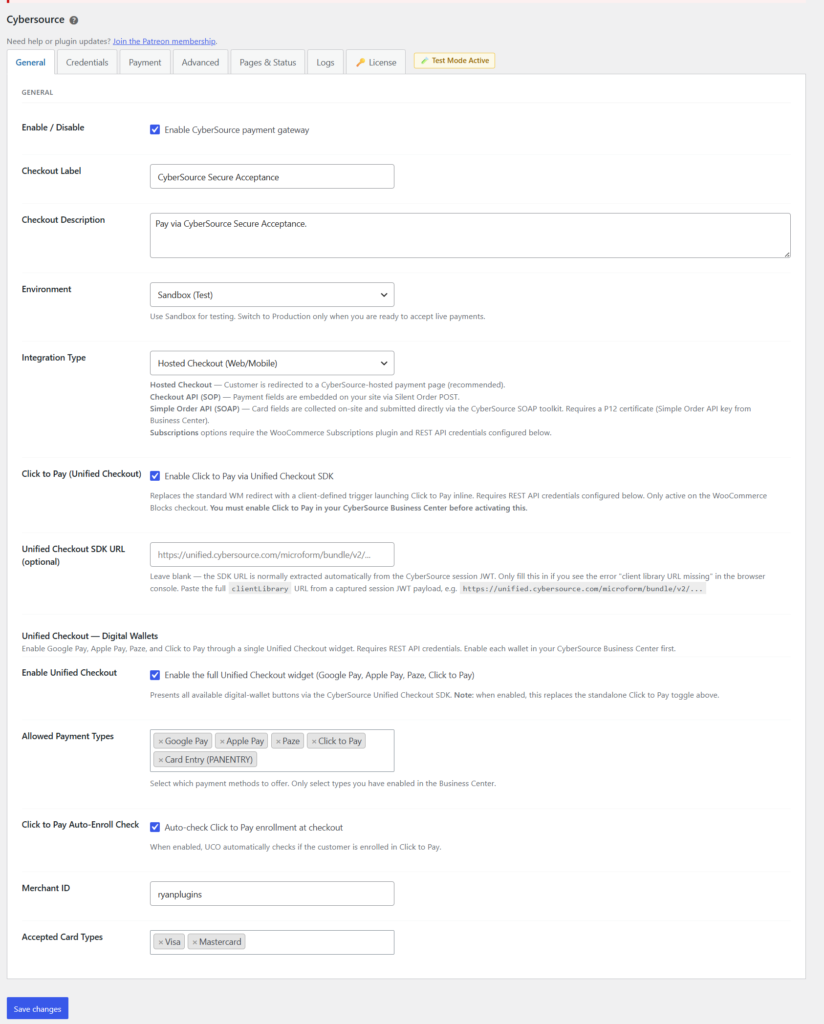
Step 3: Configure Your CyberSource Credentials
- Go to WooCommerce > Settings > Payments and select CyberSource
- Enter your CyberSource Merchant ID, API Key ID, and Shared Secret Key from your CyberSource Business Center
- Choose whether to run in Sandbox (Test) or Live mode
- Save your changes
Step 4: Test Your Checkout
With sandbox mode enabled, place a test order using CyberSource’s sandbox test card numbers to confirm the hosted card fields load correctly and that authorization, capture, and refund actions work as expected. Once testing is complete, switch the CyberSource WooCommerce Payment Gateway to Live mode to start accepting real payments. If you’re also running other RyanPlugins WooCommerce payment integrations alongside CyberSource, make sure only one gateway handles a given order flow to avoid conflicting checkout scripts.
CyberSource WooCommerce Payment Gateway Pricing
The CyberSource WooCommerce Payment Gateway plugin is available for a single, transparent price: $79 USD, one-time purchase. There are no monthly fees, no recurring license charges, and no per-transaction markup added by RyanPlugins on top of your existing CyberSource merchant fees.
CyberSource WooCommerce Payment Gateway
$79 USD, one-time purchase
Lifetime license · Free updates · No recurring fees
Buy Now on CodeCanyonCyberSource WooCommerce Payment Gateway Security & PCI Compliance
Because the CyberSource WooCommerce Payment Gateway uses CyberSource’s hosted Unified Checkout fields, sensitive cardholder data is captured and transmitted directly to CyberSource — it never passes through your WordPress database or server. This significantly reduces your store’s PCI DSS scope compared to gateways that route raw card data through your own checkout page. You’ll still need a valid SSL certificate on your store, since hosted fields require HTTPS to load securely.
CyberSource WooCommerce Payment Gateway FAQ
How much does the CyberSource WooCommerce Payment Gateway plugin cost?
The CyberSource WooCommerce Payment Gateway is $79 USD, one-time purchase. This includes the full plugin license with no recurring subscription fees from RyanPlugins.
Is the CyberSource WooCommerce Payment Gateway compatible with my theme and checkout?
Yes. The plugin works with both the WooCommerce Blocks checkout and the classic shortcode-based checkout, and is compatible with any properly coded WooCommerce theme.
What do I need before I can set up the CyberSource WooCommerce Payment Gateway?
You’ll need WordPress 5.8+, WooCommerce 6.0+, PHP 7.4 or higher, an active CyberSource merchant account with Unified Checkout enabled, and an SSL certificate installed on your store.
Is the checkout process PCI compliant?
Yes. The plugin uses CyberSource’s hosted Unified Checkout fields, so card data is submitted directly to CyberSource rather than through your server, which reduces your store’s PCI DSS scope.
Can I test the CyberSource WooCommerce Payment Gateway before going live?
Yes. The plugin includes a Sandbox mode that connects to CyberSource’s test environment, letting you place test orders before switching to Live mode.
Do I get updates and support after purchase?
Yes. Your $79 USD one-time purchase includes plugin updates and access to support through your CodeCanyon purchase account.
Get the CyberSource WooCommerce Payment Gateway Today
Ready to accept secure, PCI-compliant payments through CyberSource on your WooCommerce store? Get the CyberSource WooCommerce Payment Gateway plugin for $79 USD, one-time purchase, and have it installed and configured in minutes.
Get the CyberSource WooCommerce Payment Gateway
$79 USD · One-time purchase · Lifetime license
Buy Now — $79 USD